In this post I go over the new Google Analytics Content Experiments, a tool that can be used to create A/B tests from inside Google Analytics. This tool has several advantages over the old Google Website Optimizer, especially if you are just starting the website testing journey. Content Experiments provide a quick way to test your main pages (landing pages, homepages, category pages) and it requires very few code implementations.
Here is a quick overview of the most prominent features that will help marketers get up and running with testing:
Below is a step-by-step guide on how to use Content Experiments to create A/B tests.
In order to create a new experiment, navigate to the Content reports and click on the Experiments link on the sidebar. You will see a page that shows all your existing experiments. Above this table you will find a button Create experiment. Once you click on it you will reach the following page.
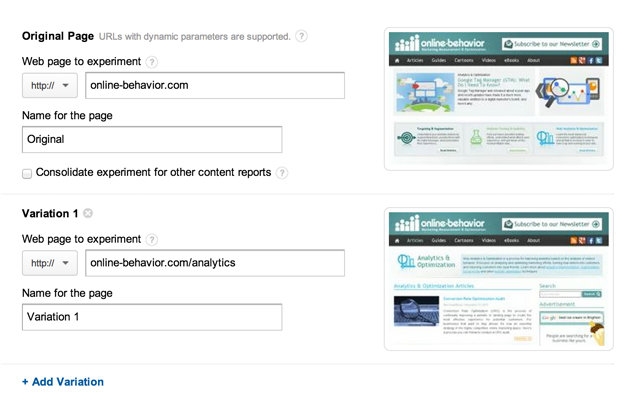
In this page you can add all the URLs of your original page and the variations you would like to test. You will see thumbnails of the page, which helps you making sure the URLs are correct.
Click Next.

In the page above you will be offered a drop down with a list of all your profile goals, which can be used as a goal for your tests. If there is not an existing goal that is also the conversion you want to measure for this specific test, you will have to create a new goal to use in the test.
In addition to that, you can set a percentage of your visits that will be included in the test. If you are testing radical alternatives to an important page, it is recommended you don't try it on 100% of your traffic, it can damage your conversions... You can choose 100%, 75%, 50%, 25%, 10%, 5%, 1%. You can also add notes to your experiment.
Click Next.

As mentioned above, you will need to implement one code in order to use this tool. In the page above you can chose to either get the code to implement immediately or to send it to your webmaster.
Click Next and your pages will be verified. If they are not you will see the following error message.

Note that you will be able to skip validation if you want, just click on skip validation and continue. But it is recommended that you check the code to understand why you are getting an error and then try validating again.

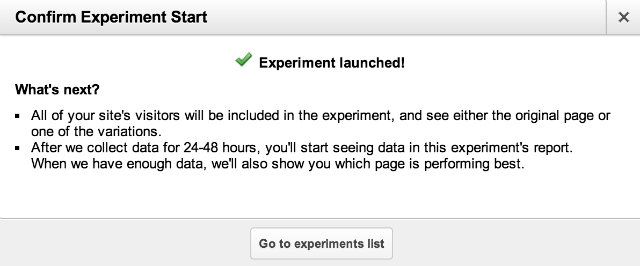
This page is a review of your article, showing all the decisions you took along the process. You can either Save and run later or Run experiment now.

In the screenshot above we see how you can navigate through a running test. We have the following capabilities:
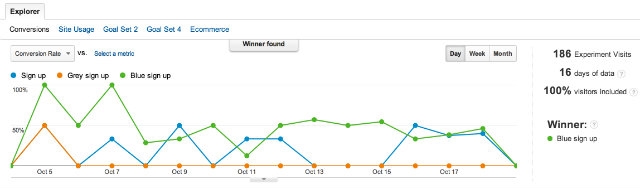
And below we see the results page of a test with a winning version, the Road Runner (purple line), with a lift of 28.5% lift in conversions as compared to the original.
Any time you want to review your experiments just visit http://onbe.co/IXznAO
All in all, Google Analytics has made a great job out of this new testing capability, especially for marketers that are still not testing often. For marketers that are more advanced there are still quite a few features missing. Here is a wishlist for future versions of this tool:
What are you waiting for, start testing!
Subscribe To Our Newsletter For Monthly Updates
So no more element or multivariate testing?
Seems like another backwards move by Google.
The message was that there will be no more multivariate testing for now. But I believe this is not final, time will say...
Hi Daniel, I think it is a great move not only because we launched Convert.com and have MVT there I think it also helps the whole industry. This is now accessible and easier then it was... even though it is simple split testing its great for the masses... agencies and experts... well guess you have to look for a new tool.
Dennis
hi, I have one question. If I have dynamic websites. how do I use Content experiment?
Marian, if you have dynamic pages I would recommend you go with this approach. It is a bit techy, but it looks robust.
I am sorry Daniel, I have had my prime developer look at what you call a solution with virtual page views and its not clear...bottom line for now...not useful for dynamically generated sites..
You are right, even though there are hacks that can work, Google Analytics Content Experiments is currently not a good solution for dynamic pages. I hope this will change...
Hi Daniel,
Thanks for the write up (saved me some time :)
Can you elaborate on:
"Conversion Rate: gives you the option to check the test results using alternative metrics."
Does this mean that I can change the metric I want to use as my conversion goal dynamically?
Thanks
Ophir
Ophir, the answer is no. You will not be able to change the goal. To be honest, you can't even define conversions that are not either a page or an event as of now. That is because the only conversion that can be used now is either a page goal or a event goa. What you can do is to analyze page conversions by segment of traffic (using Advanced Segments).
Great post, thanks..
I have found this new tool to be close to useless because of two big fails.
Test 1
Fail because my url attributes gets removed.
I have to use a URL that ends with ?opendocument, Content Optimizer removes this when adding the utm_expid... This was no problem in Gooogle Website Optimizer.
Test 2
Visits distributed very uneven
Page A 837 - Page B 1305 - Page C 252
Very strange why this is happening, with conversion rates at around 2-4 %. I will take a while before especially version C gets a chance to prove itself.
If anyone have any input to these two problems, help will be greatly appreciated :)
Thomas, here is an answer to your first question from the good guys at Conversion Works:
Simple A/B with query string parameters
This experiment is slightly more fruity. Rather than redirect to a new page, I redirect to the same page with a decorated URI. I’m using javascript to handle the content changes (look at the menu – ‘How it Works’ vs. ‘Our Process’ – a very contrived test). This poses less SEO risk I guess but adds page complexity. This is almost like a single variation MVT. The content switch could be handled by server side code too and results in quite major test variation differences. Powerful but (again) limited in variations. Notice that the CE script has been modified to do the redirect conditionally to prevent infinite redirections:
if(document.location.search.indexOf('menu=')<0){utmx('url','A/B');}
Unfortunately, I have no good answers to your issue #2.
Thank you Daniel, It seems these guys are on to something. However I have just tried to implement it - unfortunenatly Content Experiements won't accept the modifed script. [It says: Possibly broken experiment code found here: line:5, column:1.We couldn't find valid experiment code, but we found something that looks like broken experiment code] Line 5 seems good and is the same as in the orginial script.
Content Experiments working or not - I am looking for a more advanced testing tool (A/B + Multivariate) Any recommendations ?
Thomas, I would suggest you post this error on the roiginal post (the one I shared), maybe they can help you troubleshoot; or maybe they will just suggest you to skip validation...
As for other tools, I am currently using Visual Website Optimizer for Multivariate Testing. The pricing is fine and the tool seems robust.
Does Content Experiments require asynchronous GATC?
Yes.
Having switched over from GWO to Content Experiments within Analytics we're finding the data is lacking accuracy.
Running an A/B test where visitors are purchasing a product. The conversion is when the user lands on the thank you page to download their purchase.
Content Experiments seems to be tracking not unique visitors to this page, but rather each time a user visits the thank you page (if there is some time between the visits).
This means that the data is (sometimes) showing 2 conversions even when only 1 occurred. This happens when a user goes to the thank you page after purchase. Leaves the page and then comes back to it hours or even a day later to download the product they purchased.
Before with GWO, only 1 conversion would be tracked. But now, sometimes 2 are showing = the whole experiment isn't accurate with Content Experiments.
Has anyone else had this issue?
Any solutions or suggestions?
Thanks!
Hi Mike,
I am an Amature in Web Analytics and just launched my first Content Experiment (tha's how I am reading this post).
Coming back to your problem, I think the issue is with what you are tracking. Instead of a URL Goal to the thank you page, in order to get more valid and reliable data, you might have to set up even tracking for the download button. that way, no matter how many time the customer visit the page, only one conversion will be recorded when he clicks "download button"
And, by the by, Great post. Very useful.
Hello there,
I'm having trouble with my goals that are not being tracked anymore since launching the experiment. Everything seems to be fine in terms of the code setup - but since i launched the test, it simply doesn't track the goal i selected as a conversion.
Has anyone had the same issue?
Suggestion would be highly appreciated:)
Hi Marius. Are there multiple subdomains on your website? Things linke example.com and cart.example.com? That might be one of the causes...
Yes, we do have multiple subdomains, but we currently only use one two of them.
Any suggestions starting from here?
You will need to update your Content Experiments code on the original page. Here is an explanation from the Google Analytics help center: Run an Experiment Across Subdomains.
Tried to setup a test for two different websites already. I got this error each time:
Experiment code missing the cookie domain name declared in tracking code:line:297, column:14. Your page customizes the cookie domain name in the Google Analytics tracking code. The same customization should be present in the experiment code.
Any ideas why the reffered customization doesn't appear in the initial code?
Maria, it looks like you have the same issue as Marius Pop, an issue with tracking multiple subdomains on Google Analytics. Please check the link above in my reply to Marius. Let me know if it does not help.
Partly yes. On one of the websites there are no subdomains. We managed to start the experiments but still no conversions shown.
On the site with subdomains we started the experiment but only a tiny fraction of the conversions are being tracked. Anymore ideas?
Maria, Did you ever get it to work? I use many subdomains and dont know which one is coming in the referring url. I set the root level domain in the tag and set the __udn before the experiment code as Daniel suggested.
Also, because the ecommerce happens on a different root domain I have the root domain tags set with _setDomain none and setAllowLinker true and have links between root domains with the appropriate onclick events to attach the cookie data.
With the reporting delays its so hard to tell if anything works but it doesnt seem like it. Pity visual website optimizer is so expensive for heavy traffic.
Hi,
I was running my experiments through CE. I have doubts on a few things.
a) why is there a 2 week minimum (recommended) time before we see a clear winner?
b) isn't winner, the variation that has the highest probability 'converted' > than that of original version? isn't that just a simple frequency rule? i.e. if 4 out of 5 conversions are higher than original, then we choose that variation? It's not such a magic metric. Any one with business acumen can decide the winner. again, it has the flaw, because it doesn't give weights to most recent conversions.
c) how does CE sample the visitors to divert to each variations of the page?
Cheers
I'm stumped. I'm stuck at Step 4: Review experiment where it shows the two thumbnails. The variation shows correctly but the ORIGINAL is blank. The link below the image works to take me to the original page. These are not pages that require logging in. And the previous code validation worked correctly. I've refreshed and gone back and forth between experiment steps. I'm stumped.
Hi Daniel, thanks for the great post. I'm trying to get this working on a wordpress site, but it keeps giving me a validation error for the original page:
Experiment code found after the Google Analytics tracking code:line:36, column:69, line:91, column:1.
Make sure the experiment code is immediately after the opening tag, so that it is before the Google Analytics tracking code.
I don't know if it's finding the re-marketing code and calling it broken? Any suggestions?
Hi Daniel, I'm with the rest, this is a great article and thank you for your input about content experiment. This is the first time I'm running an experiment and I'm not sure if I'm doing something wrong or I just have to wait, but in my case I turn experiment on with my original variation and two variation on sub domain (I do have my analytics code looking to sub domain sites), however the first day I can see everything looks good with rotation and visits flowing to all variation, but next day I don't see rotation, experiment seems to work but the majority of my traffic is going to the original variation. I'm going crazy trying to figure out what went south. I can say that 90% goes to my original variation and 5% to each of the other two variation. I select to have all 100% of traffic included in the experiment and I can'f find out a solution or an explanation of what could be happening. Do you or anyone have any idea of what might be going on?
Thank you in advance and like I said great article.
No matter what I seem to do I can't get Google to validate my code. What's strange is that it says that there's code (it validates code that is) on the variation page, though I placed no code there. For me this has been a complete and total bust and have not been able to get any experiments to run. I'll submitting a support ticket via my adwords account but this has been a huge step backward.
wonderful guidelines Dan, but i have got a little issue, This is the first time I'm running an experiment and I'm not sure if I'm doing something wrong or on my first day, the rotation was literally okay, but on the second day, it just wasn't rotating the next day, thanks for your reply.
Hi Daniel, how can I add content experiment code to my google sites. Google suggests to put the experiment code immediately after the but google doesn't allow to edit part of the site.
Do you know if there is a way to make the minimum experiment time longer than 2 weeks? I have a client who would like the experiment to run 3 months.
Hi,
Very nice article thanks for sharing.
I want to know, is there any way to do this experiment for large dynamic sites?
Like I have www.keeparticles.com, I want to experiment article page.
What I want is www.keeparticles.com /article_1.html should redirect to
www.keeparticles.com /new/article_1.html
and similarly
www.keeparticles.com /article_2.html should redirect to
www.keeparticles.com /new/article_2.html
and so on.
Is there anyway to do this?
Thanks in advance.
Hi
Very nice article. It helped me a lot understanding content experiments.
But I have a question.
My goal type is currently URL Destination.
And we push conversions manually to analytics after phone call matching ususally it takes one day.
We use this code for pushing conversions.
var _gaq = _gaq || [];
_gaq.push(['_setAccount', 'XX-XXXXXXXX-X']);
_gaq.push(['_setAllowAnchor', true]);
_gaq.push(['_trackPageview','/call/conv ']);
What I want to know is how do I push a conversion manually for a specific variation.
Thanks in advance for help.
Nice post! Do you have any recommendations on techniques for determining which pages (and page elements) to test?